Choose the view before judging the page
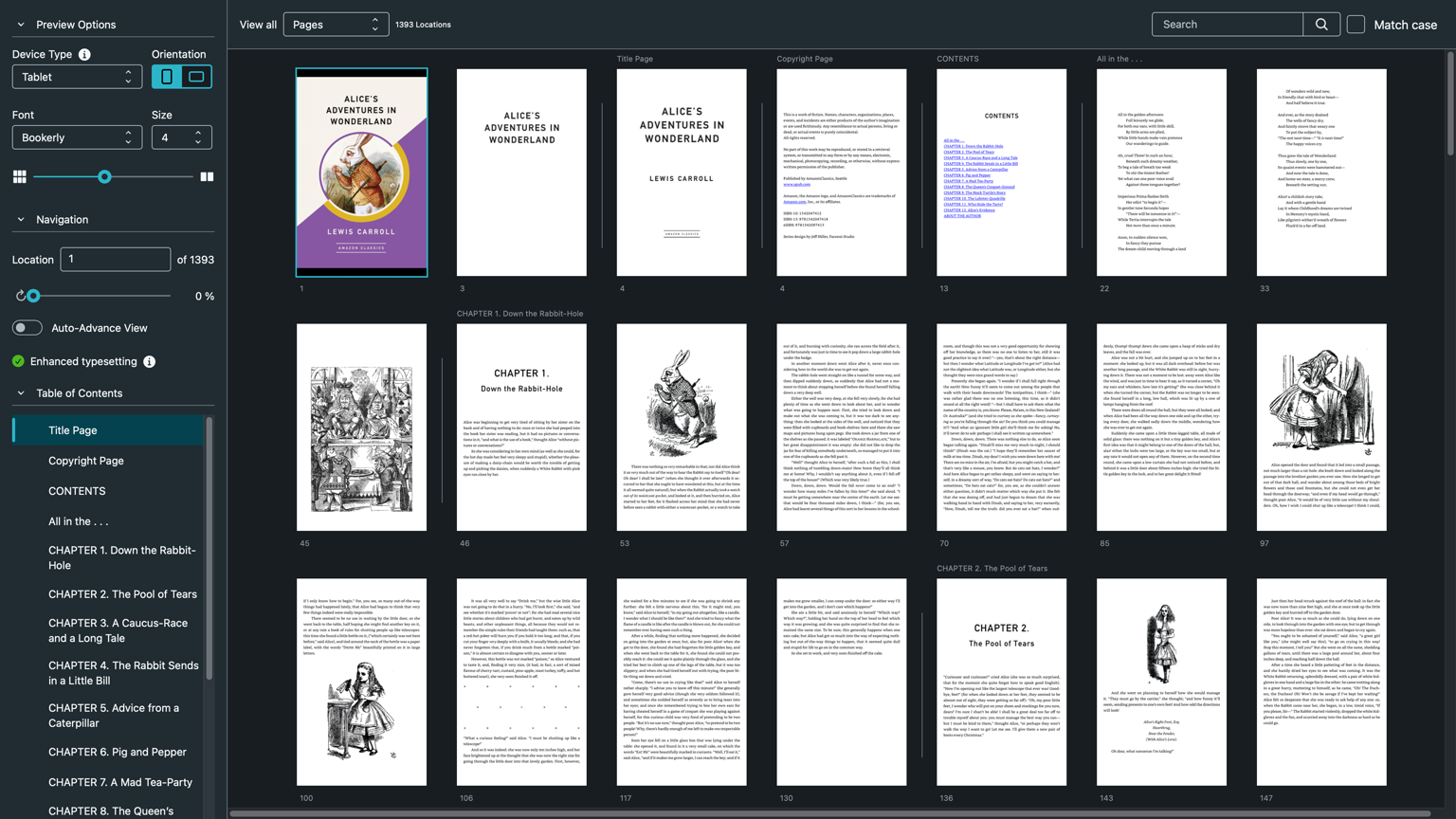
KDP describes Kindle Previewer as a free desktop application for seeing how an ebook will look before publication. Its help page says the tool can vary device type, orientation, font, and font size; it can also filter for elements such as images, lists, and tables. That gives an editor a useful set of rehearsals. It does not turn one desktop application into every reader’s actual device, settings, accessibility tools, or network state.
Open the same chapter as a Kindle e-reader, phone, and tablet view. For each, inspect portrait and landscape, then increase font size. Start with the title page and contents, but do not stop there. Go to a chapter opening, a short paragraph after a heading, a quotation or poem, an image and caption, a table or list, a note, and the final page. Write down the location and what changed. ‘Looks fine’ is too soft to help the next revision.
Use filters to find the exceptions
Instead of paging through a long book hoping to notice every table, use Previewer’s element filters to gather the pages that contain images, lists, or tables. Then read those objects in context. An image may look contained but become separated from its caption; a list may retain bullets while losing its lead-in sentence; a table may remain visible while becoming too dense to interpret at the selected size. The tool can direct attention. Editorial judgment still decides whether the route is usable.
Use Auto-Advance only as a sweep for conspicuous interruption: a blank chapter, a stranded heading, a missing illustration, or a repeated page. Pause at every flagged point and navigate there normally. An automated flip-through is not a reading, and it cannot tell you whether a return link or contents label makes sense.
Keep Previewer’s limits in the record
KDP explicitly notes that reflowable content adapts to screen and font size, so a specific location can differ between Previewer and devices of different sizes. It also says the online previewer has the same basic functions but fewer filter and display options than the desktop version. These are reasons to state the tool and view used, not reasons to abandon previewing. The model is still useful when its boundary is named.
Make a proofing sheet with file version, Previewer version, selected device model, orientation, font size, locations examined, outcome, and follow-up. If the intended release also needs a physical Kindle, a particular Kindle app, or assistive technology, list that as a separate test rather than quietly treating Previewer as its substitute. No observed test should be expanded into a claim about unobserved devices.
Release the smallest verified statement
A defensible note reads: ‘Reviewed in Kindle Previewer using named views on this date; outstanding device checks remain.’ This is less dramatic than saying a book works everywhere. It is also a record an editor can repeat after the next manuscript update.
Sources & limits
No Kindle Previewer, Kindle device, app, or KDP upload was used for this entry. This guidance does not certify delivery, Enhanced Typesetting eligibility, or behavior on a reader’s device.
- Kindle Previewer
Amazon KDP · Source undated · Consulted 16 Sept 2026KDP describes Kindle Previewer’s device, orientation, font, element-filter, and Auto-Advance views; it notes reflowable content can differ by screen and font size and lists supported input formats.
- KDP Tools and Resources
Amazon KDP · Source undated · Consulted 16 Sept 2026KDP distinguishes the desktop Kindle Previewer from the Online Previewer and says the latter has fewer filter and display options; it frames the online tool as a last check before KDP publication.
- Kindle Previewer
Amazon · Source undated · Consulted 16 Sept 2026The first-party product page presents Kindle Previewer 4 with device, orientation, and font controls and examples for images, tables, drop caps, links, and lists.
Send a correction with the passage and supporting source.